
Why is my WWVDS system not communicating wirelessly to the highlighted sign(s)?
This article discusses the troubleshooting steps to take for wireless communications issues between the WWVDS cabinet and highlighted signs.
If one or more signs are not communicating with the WWVDS system, check the following:
- Make sure the antenna connections are secure.
- Verify that there is a clear line of sight between the wireless devices.
- Check that the antenna cable and connectors are properly connected.
- Make sure 12 VDC is being supplied to the input of the Sign Controller.
- Make sure the wireless board is installed correctly and that all pins are properly connected.
LED Light Patterns
GovComm Sign Controller – Version 1 (GC-FD1)
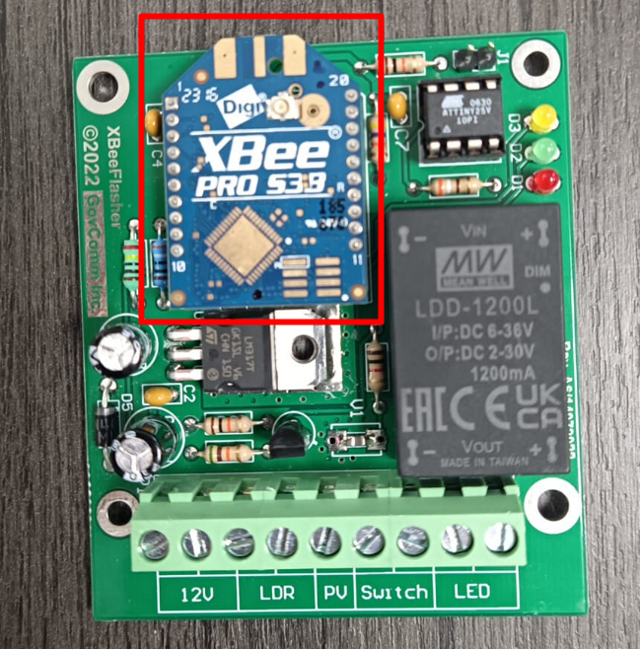
For a wireless installation:
- Green LED: Should continuously flash.
- Yellow LED: Remains ON while the board is attempting to pair with the transmitter.
- You can verify the wireless connection by scanning the signs in the software.
When the Sign Is Activated
The expected LED behavior is:
- Green LED: Continuously flashing
- Red LED: Flashing for approximately 30 seconds
- Wrong Way Sign: Flashing while the Red LED is flashing
GovComm Sign Controller – Version 2 (GC-FD2)
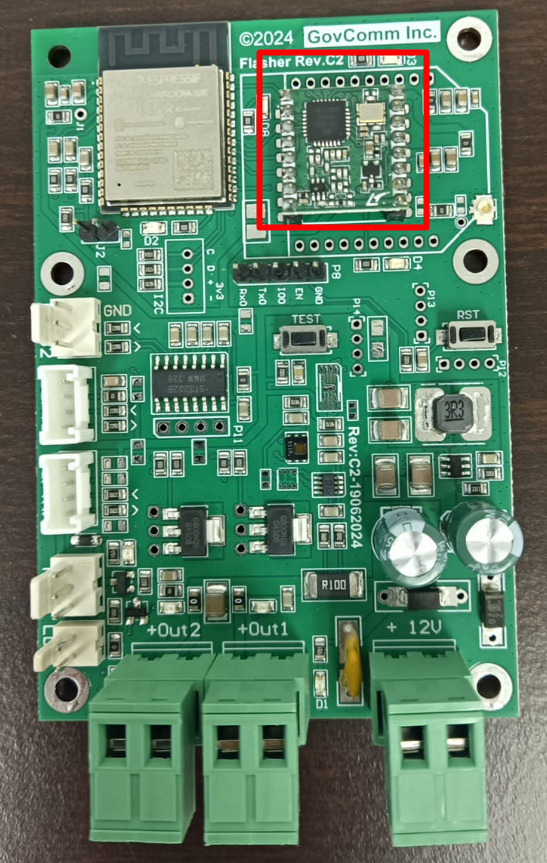
- Confirm that the red heartbeat LED is flashing on the controller board.
- Press the TEST button on the board once and confirm that the wrong-way sign flashes for approximately 30 seconds.
Contact GovComm Technical Support for further assistance in troubleshooting.