
How do I troubleshoot my WWVDS camera that is experiencing an intermittent issue?
This article discusses how to troubleshoot your WWVDS camera that may be experiencing an intermittent issue.
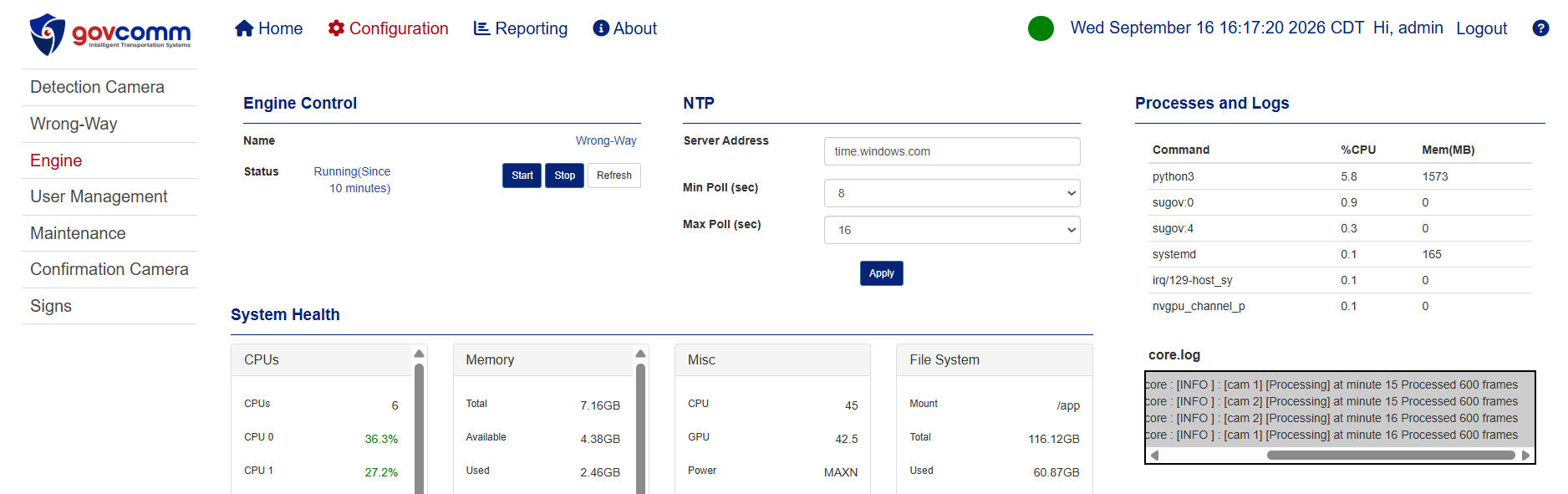
To determine whether the detection camera is experiencing an intermittent issue, we can check the FPS (frames per second) information in the core.log .
If the system is showing approximately 600 frames per minute, this indicates that the detection camera is consistently sending video frames and that there is likely no intermittent issue with the camera.
In this case, the problem is more likely related to the connection between the customer's server/laptop and the WWVDS system.
How to Check the Detection Camera Frames
To verify the number of frames being received from the detection camera:
- Log in to the WWVDS web interface.
- Go to Configuration → Engine.
- On the right side of the page, locate the
core.logwindow. - Check the frame count/FPS information for the detection camera.
If the frame rate remains around 600 frames per minute, the camera is operating normally.
How to Check the Confirmation Camera Frames
The core.log provides frame information for the detection camera only.
If you are experiencing an intermittent issue with the confirmation camera, you can temporarily swap the RTSP streams between the detection and confirmation cameras. This will allow the confirmation camera to be treated as the detection camera so that its frame rate can be monitored in the core.log .
Swap the RTSP Streams
- Go to Configuration → Maintenance.
- Select the Revert Direction button.
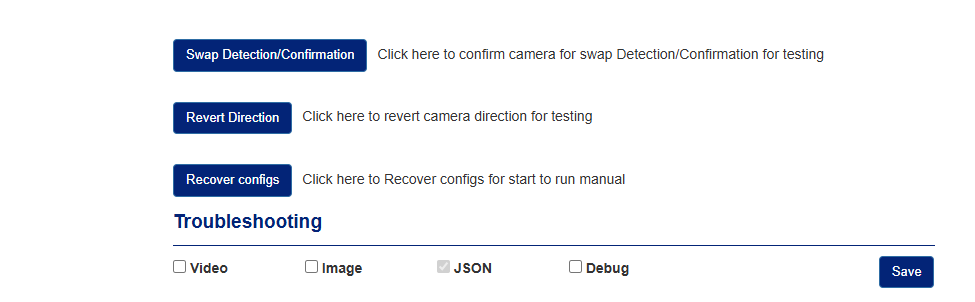
The system will automatically swap the detection and confirmation cameras.
Allow the cameras to run for approximately 5 minutes, then return to the core.log to verify the frame rate.
Important – Restore the Original Settings
After troubleshooting the confirmation camera, restore the original camera configuration:
- Go to Configuration → Maintenance.
- Select the Recover Configs button.
This will automatically restore the detection and confirmation cameras to their original configuration.
Possible Causes of an Intermittent Connection
An intermittent issue can also be caused by antivirus software or firewalls on the customer's laptop or server.
When antivirus software is installed, it inspects network packets as they are sent and received. Because the WWVDS uses high-definition cameras with a high frame rate, there can be a significant amount of network traffic.
If the antivirus software cannot process all of the traffic quickly enough, it may begin dropping or delaying packets. This can result in skipped frames and an intermittent video connection.
Therefore, if the core.log shows that the camera is consistently providing approximately 600 frames per minute, the customer's should also be investigated:
- Network connection
- Firewall settings
- Antivirus software/settings
If you have any questions on this troubleshooting procedure, please contact GovComm here.